 2c516362df
- Added Predis library for Redis connection (no PHP extension required)
- Server-side SMS code generation and storage in Redis
- Rate limiting and brute-force protection
- Integration with n8n webhook for SMS sending
- Environment variables moved to .env file
- Fixed policy verification endpoint
- Added file-based fallback if Redis unavailable
231 lines
5.6 KiB
Markdown
231 lines
5.6 KiB
Markdown
# t-datepicker
|
|
|
|
|
|
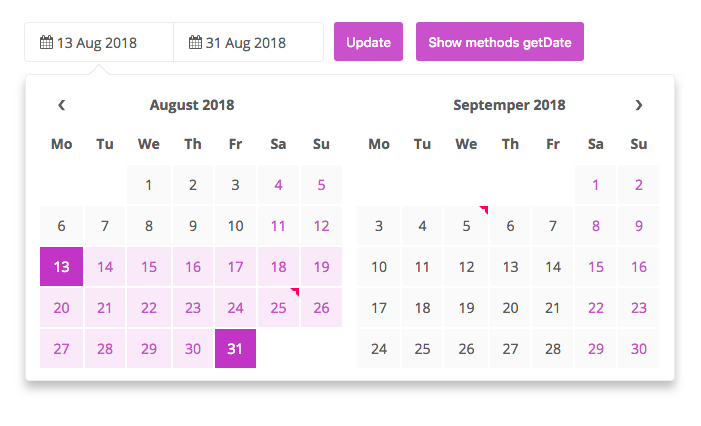
jQuery-based date picker! This date picker provides an easy way of creating both single and multi-viewed calendars capable of accepting single, range, and multiple selected dates. Easy to style, with many example styles.
|
|
|
|
t-datepicker is a responsive, flexible, elegant, themeable, highly-configurable data range picker written in JavaScript (jQuery) and CSS(SASS).
|
|
|
|
Suitable for hotel app that enables the users to quickly select check-in and check-out dates in a convenient calendar popup.
|
|
|
|
[![NPM version][npm-image]][npm-url] [![Downloads][downloads-image]][npm-url]
|
|
|
|

|
|
|
|
## Quick start t-datepicker
|
|
* Clone the repo: `git clone git@github.com:crazychicken/t-datepicker.git`
|
|
* Install with npm: `npm install --save-dev t-datepicker`
|
|
* Install with npm: `npm install --save-dev crazychicken/t-datepicker`
|
|
* Or download the [latest release](https://github.com/crazychicken/t-datepicker/archive/master.zip)
|
|
|
|
## Demos
|
|
https://t-datepicker.getqwerty.com/demos.html
|
|
https://t-datepicker.getqwerty.com/demo-only-calendar.html
|
|
|
|
## Documentation
|
|
https://t-datepicker.getqwerty.com/documents.html
|
|
|
|
## Options
|
|
https://t-datepicker.getqwerty.com/options.html
|
|
## Events
|
|
https://t-datepicker.getqwerty.com/events.html
|
|
## Methods
|
|
https://t-datepicker.getqwerty.com/methods.html
|
|
|
|
## How to use
|
|
|
|
* First, include CSS files into your HTML head:
|
|
```html
|
|
<link rel="stylesheet" href="public/theme/css/t-datepicker.min.css">
|
|
<link rel="stylesheet" href="public/theme/css/theme/t-datepicker-main.css">
|
|
```
|
|
|
|
* Include file `t-datepicker.min.js` into the footer.
|
|
```html
|
|
<script src="your-part/jquery.min.js"></script> // ~1.9.2
|
|
<script src="public/theme/js/t-datepicker.min.js"></script>
|
|
```
|
|
|
|
* Set HTML
|
|
```html
|
|
<div class="t-datepicker">
|
|
<div class="t-check-in"></div>
|
|
<div class="t-check-out"></div>
|
|
</div>
|
|
```
|
|
|
|
## Call global the function
|
|
```html
|
|
<script type="text/javascript">
|
|
$(document).ready(function(){
|
|
$('.t-datepicker').tDatePicker({
|
|
// options here
|
|
});
|
|
});
|
|
</script>
|
|
```
|
|
|
|
* If you want use two different calendar, you just insert the new class.
|
|
|
|
```html
|
|
<div class="t-datepicker class_a">
|
|
<div class="t-check-in"></div>
|
|
<div class="t-check-out"></div>
|
|
</div>
|
|
|
|
<div class="t-datepicker class_b">
|
|
<div class="t-check-in"></div>
|
|
<div class="t-check-out"></div>
|
|
</div>
|
|
```
|
|
|
|
## Call only the function
|
|
|
|
```html
|
|
<script type="text/javascript">
|
|
$(document).ready(function(){
|
|
// Call global the function
|
|
$('.t-datepicker').tDatePicker({
|
|
// options here
|
|
});
|
|
$('.class_a').tDatePicker({
|
|
// options only here
|
|
});
|
|
$('.class_b').tDatePicker({
|
|
// options only here
|
|
});
|
|
});
|
|
</script>
|
|
```
|
|
|
|
## Call only picker
|
|
|
|
* You need add class .t-picker-only include .t-check-in.
|
|
|
|
```html
|
|
<div class="t-datepicker">
|
|
<div class="t-check-in t-picker-only"></div>
|
|
</div>
|
|
```
|
|
|
|
* Now call the tDatePicker initializer function and your tDatePicker is ready. [View Demo](https://t-datepicker.getqwerty.com/demo-only-calendar.html)
|
|
|
|
```html
|
|
<script type="text/javascript">
|
|
$(document).ready(function(){
|
|
$('.t-datepicker').tDatePicker({
|
|
autoClose: true,
|
|
limitNextMonth: 3,
|
|
numCalendar : 1,
|
|
dateRangesHover: false
|
|
});
|
|
});
|
|
</script>
|
|
```
|
|
|
|
## You can choose more themes color:
|
|
* t-datepicker-blue.css
|
|
* t-datepicker-bluegrey.css
|
|
* t-datepicker-cyan.css
|
|
* t-datepicker-green.css
|
|
* t-datepicker-lime.css
|
|
* t-datepicker-main.css
|
|
* t-datepicker-orange.css
|
|
* t-datepicker-purple.css
|
|
* t-datepicker-teal.css
|
|
* t-datepicker-yellow.css
|
|
|
|
## Options
|
|
|
|
// Action
|
|
* autoClose
|
|
* durationArrowTop
|
|
* valiDation
|
|
|
|
// Format
|
|
* formatDate
|
|
|
|
// Date
|
|
* dateCheckIn
|
|
* dateCheckOut
|
|
* startDate
|
|
* endDate
|
|
* limitPrevMonth
|
|
* limitNextMonth
|
|
* limitDateRanges
|
|
* fnDataEvent
|
|
* mergeDataEvent
|
|
* showFullDateRanges
|
|
|
|
// Theme
|
|
* numCalendar
|
|
* titleCheckIn
|
|
* titleCheckOut
|
|
* titleDateRange
|
|
* titleDateRanges
|
|
* titleToday
|
|
* titleDays
|
|
* titleMonths
|
|
* titleMonthsLimitShow
|
|
* replaceTitleMonths
|
|
* showDateTheme
|
|
|
|
// Icons
|
|
* iconArrowTop
|
|
* iconDate
|
|
* arrowPrev
|
|
* arrowNext
|
|
|
|
// Active date
|
|
* toDayShowTitle
|
|
* dateRangesShowTitle
|
|
* dateRangesHover
|
|
* toDayHighlighted
|
|
* nextDayHighlighted
|
|
* daysOfWeekHighlighted
|
|
* dateDisabled
|
|
|
|
## Tree
|
|
```
|
|
public/
|
|
└── theme/
|
|
└── css/
|
|
| └── t-datepicker.min.css
|
|
| └── themes/
|
|
| └── t-datepicker-main.css
|
|
| └── more themes
|
|
└── js/
|
|
└── t-datepicker.min.js
|
|
sass/
|
|
├── // Themes Color
|
|
└── t-datepicker-v1.0.0.scss // @import 'path sass file your project';
|
|
```
|
|
|
|
## Template full feature list
|
|
|
|
* Semantically Correct / Valid HTML Code
|
|
* HTML5, CSS3
|
|
* Javascript / JS6
|
|
* Full project and seed project (build with: Gulp, Sass, Javascript, Npm, Babel, Webpack)
|
|
* Cross browser compatible ( Internet Explorer 10+, Firefox, Safari, Opera, Chrome etc. )
|
|
* W3C Valid source code, properly formatted and commented
|
|
* Animations CSS3
|
|
|
|
## Creators
|
|
|
|
#### Tuds - Crazychicken (CLGT Groups)
|
|
* website: http://getqwerty.com/
|
|
* Github: https://github.com/crazychicken/t-datepicker
|
|
* Facebook: https://www.facebook.com/tudscss/
|
|
* Youtube: https://www.youtube.com/channel/UCDACe-7BFGDucQoxTDfPotw
|
|
* Twtter: https://twitter.com/mtu_truong
|
|
|
|
|
|
[downloads-image]: https://img.shields.io/npm/dm/t-datepicker.svg
|
|
[npm-url]: https://www.npmjs.com/package/t-datepicker
|
|
[npm-image]: https://img.shields.io/npm/v/t-datepicker.svg
|
|
|
|
|
|
## Copyright and license
|
|
|
|
Code and documentation copyright 2018, MIT license.
|